Apps and tools that keep old Macs useful — from PowerPC to Intel, with a few classic Mac ideas brought to Apple Silicon. Why throw away a Mac that still works? True sustainability is using what we have.
Tiger QuickLook
A lightweight Quick Look substitute that runs natively on Mac OS X 10.4 Tiger. Quick Look itself only arrived in Leopard (10.5), so Tiger never had it. This brings back the Leopard-style gesture — select a file in the Finder, press Space, and a preview window appears — on a real Tiger machine. The aim is to see what a file is when the name doesn't tell you: it covers images, PDF, plain text, and even Office documents (see the table below), using nothing but tools Tiger already ships. Still an early release (v0.6), with more being added.
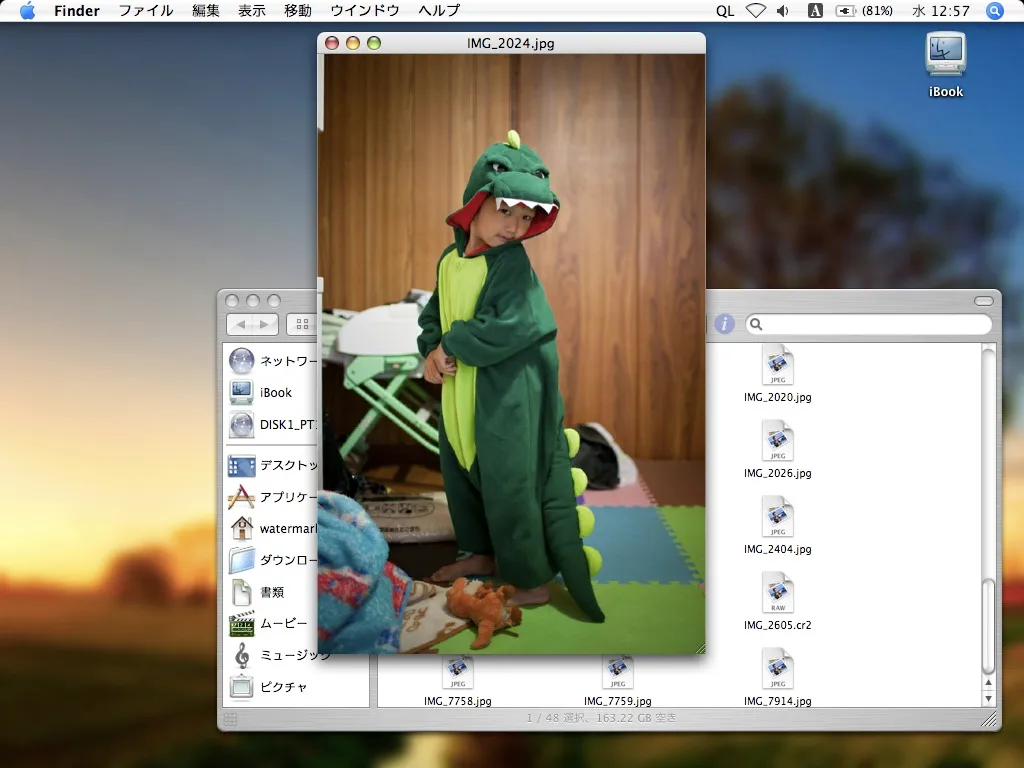
Press Space on a file in the Finder, and this shows up — on real Tiger hardware.
This is not needed if you only ever use the one-shot mode (
open -a TigerQuickLook.app /path/to/file).
Changelog
- 2026-09-22 — v0.6: Fixed dismissing a preview for a file on the Desktop opening a new Finder window at the startup disk's root. The cause: the method used to hand focus back to Finder took the same path as clicking its Dock icon whenever it had zero open document windows (the Desktop doesn't count as a window), which opens a new one by default. Switched to Carbon's SetFrontProcess to bring Finder forward without that side effect.
- 2026-09-18 — v0.5: Removed the ~0.3-second dead zone right after switching to the Finder where Space didn't yet work (a MacRumors reader's suggestion led to swapping the 0.3s polling loop for a Carbon event that detects the frontmost-app switch instantly). Arrow-key navigation now syncs the Finder's own selection (the blue highlight) to the file being previewed. The "QL" menu now shows the version number. Also switched arrow-key sort order to be numeric-aware, so "2.jpg" sorts before "10.jpg" like the Finder's own Name sort (if Icon view is arranged some other way, this order won't match what's on screen — List view or Icon view sorted by Name lines up exactly)
- 2026-09-09 — v0.4: arrow-key navigation now skips files it can't preview (a broken xlsx, an Office file whose text can't be extracted) and continues to the next one that displays, instead of stopping with the previous file's preview still on screen. A beep marks the end of the run. The app's own text (menu, alerts, tooltip) is now shown in both English and Japanese.
- 2026-09-09 — v0.3: arrow-key navigation now swaps just the content instead of recreating the window (less flicker, keeps the window's position and size).
- 2026-09-09 — v0.2: expanded the supported formats (no new libraries — only Tiger's own textutil / unzip). Images gain TIFF / GIF / BMP; plain text now covers .md plus .csv / .json / .xml / many source types and extension-less text; legacy Office (DOC / RTF / HTML via textutil); modern Office (DOCX / PPTX / XLSX / ODT / ODS / ODP by pulling the body XML out of the zip). The goal is identifying a file you can't place by name, not faithful rendering. Also: while a preview is open, ← / → / ↑ / ↓ move to the previous/next file in the same folder (like Leopard's Quick Look).
Supported Formats
The goal is identifying a file you can't place by name, not faithful rendering — if the text inside comes through, that's enough.
| Images | JPG / PNG / PDF / TIFF / GIF / BMP — drawn directly via ImageIO / Quartz. PDF shows page 1 only. |
|---|---|
| Text | TXT / MD / CSV / JSON / XML and many source types — first 64 KB, shown raw in a monospace window. Extension-less files are previewed too if the content looks like text. |
| Legacy Office | DOC (Word 2004 etc.) / RTF / HTML — run through Tiger's own textutil -convert txt. |
| Modern Office | DOCX / PPTX / XLSX / ODT / ODS / ODP — unzip -p the body XML, then strip tags. |
Not covered: RAW, faithful layout, every page/sheet of a multi-page document. No extra libraries — the only external dependencies are Tiger's bundled textutil and unzip.
How to Use
Bring the Finder to the front, select one file, and press Space. Press Space again
(or Esc in the window) to close it. While a preview is open, ← / → / ↑ / ↓
move to the previous/next file in the same folder, in name order — files it can't display are
skipped over, and a beep marks the end of the run. The Finder's own selection follows along too, so
it's clear which file you're actually looking at. It's the same feel as Leopard's Quick Look, so you
can flip between images without pressing Space again. When the app is
running as a resident agent, a "QL" item appears at the right end of the menu bar
— quit it from there (or killall TigerQuickLook in Terminal). When something other
than the Finder is frontmost, Space behaves normally and is not intercepted.
Installation
- Open
TigerQuickLook.dmg(from the button above) and dragTigerQuickLook.appinto yourApplicationsfolder. - Enable "access for assistive devices" — see the yellow box above. Without it the Space-bar feature cannot start.
- Launch
TigerQuickLook.appwith Finder double-click,open TigerQuickLook.app, or a Login Item. Do not run the executable by path (.../MacOS/TigerQuickLook) — that skips LaunchServices, so the menu bar item, the Finder queries, and the preview window all go dead (only the event tap keeps working, which makes it easy to misdiagnose). - To keep it always available, add
TigerQuickLook.appto System Preferences → Accounts → Login Items.
Limitations
- Pressing Space while renaming a file inline in the Finder types no space and opens a preview instead — there's no way for an outside process to tell the Finder is in text-edit mode. Press Esc to recover.
- Arrow-key navigation moves through files in name order (numeric-aware, so "2.jpg" comes before "10.jpg"). In List view, or Icon view arranged by Name, that matches what's on screen exactly; with any other Icon view arrangement it won't.
Supported Environment
| Verified | iBook G4 (PowerBook6,5) / Mac OS X 10.4.11 (Tiger) |
|---|---|
| Requirement | PowerPC Mac, Mac OS X 10.4 (Tiger) |
A personal hobby project provided with no warranty. MIT licensed. Full source, license, and development notes are in the GitHub repository.
The whole app is a single src/main.m, built with a plain gcc invocation from
build.sh — xcodebuild is broken on this machine (DevToolsSupport.framework
is missing), so the .app bundle is assembled by hand in a shell script.
"Don't make it heavy" drove every decision
The target is a 2005 iBook G4 (1.2 GHz, 1.25 GB RAM). Images are shrink-decoded from the start
via CGImageSourceCreateThumbnailAtIndex with kCGImageSourceThumbnailMaxPixelSize,
never decoded at full resolution. PDFs use CGPDFDocumentCreateWithURL and draw only page 1
with CGContextDrawPDFPage (PDFKit doesn't exist on Tiger) — because pages are parsed
lazily, even a 250-page PDF opens instantly; only the complexity of page 1 matters, not the file size.
TXT reads just the first 64 KB via NSFileHandle into a read-only NSTextView.
No prefetch, no cache, the window is disposable. A 5.4 MB PDF with a 2550×3300 scanned image on
page 1 opens after a brief pause with slightly sluggish drag-resize — judged good enough that an
offscreen bitmap cache wasn't worth adding.
Getting "one Space press" to work
The hard part. A Services-menu approach doesn't work: Tiger's Finder doesn't put the selected file on the
Services pasteboard, so the item is always greyed out (fixed in 10.5). A modified shortcut like
⌘Y would be easy with Carbon's RegisterEventHotKey and needs no system
setting, but "the key is too far away." That leaves CGEventTap as the only way to
conditionally intercept an unmodified single key — and on Tiger a CGEventTap can't be
created at all unless "Enable access for assistive devices" is on. That requirement is unavoidable, so
it's called out loudly in the docs as a one-time setup step.
Widening the formats without adding a single library
v0.2 grew the format list from four to a couple of dozen, and the rule was: no new dependencies. A
small classifier dispatches by extension (with a content sniff, so an extension-less file that's really
text still previews). Images just gain the rest of what ImageIO already reads (TIFF/GIF/BMP). Legacy
.doc, .rtf and .html are piped through /usr/bin/textutil,
which Tiger ships — Japanese survives the round trip. The modern Office formats are zip archives,
so /usr/bin/unzip -p pulls out the body part (word/document.xml,
ppt/slides/slide*.xml, xl/sharedStrings.xml, content.xml) and the
tags get stripped in code. It's identification-grade, not layout, which is exactly the goal.
Bugs and lessons along the way
[event characters] directly (like Terminal) receive the full-width character. The fix: never leave the tap enabled all the time — enable it only while the Finder is frontmost or a preview is showing. v0.1–0.4 decided that with a 0.3 s NSTimer poll (Tiger has no NSWorkspaceDidActivateApplicationNotification — that's 10.6+), which left a ~0.3 s dead window right after switching to the Finder. v0.5 replaced the poll as the primary trigger with Carbon's kEventAppFrontSwitched — a public event, available since 10.0, that fires the instant the frontmost process changes — so the tap turns on immediately; the poll is still there, just slowed to 2 s, as a fallback in case the event is ever missed.
.../MacOS/TigerQuickLook directly skips LaunchServices, so LSUIElement never applies and the status-bar item, the NSAppleScript calls to the Finder, and the preview window are all unresponsive. Only the low-level CGEventTap still fires, which makes it easy to chase the wrong bug. Always start it via open, a double-click, or a Login Item.
CGFloat doesn't exist (it came with the 64-bit move in Leopard) — use plain float. A CGPDFPageRef does not keep its parent CGPDFDocumentRef alive: retain only the page, release the document, and the next access to the page hits freed memory and crashes with EXC_BAD_ACCESS — hold the document and re-fetch the page with CGPDFDocumentGetPage each time. And @"..." literals with non-ASCII bytes get mangled by GCC 4.0, so every user-visible string goes through [NSString stringWithUTF8String:].
.icns files render as a blank white icon on Tiger. Today's iconutil produces PNG-based icon types (ic07/ic08/…, 256–1024 px) that Tiger's Finder can't parse. Tiger only reads the classic types (is32/il32/ih32/it32 plus 8-bit masks, 16–128 px, uncompressed or PackBits). libicns' png2icns produces a correct one: png2icns out.icns 16.png 32.png 48.png 128.png.
scp-ing the changed file to the iBook, and running build.sh over ssh — but screencapture run from an SSH session produces nothing (the process has no WindowServer connection), so every UI check has to happen standing in front of the iBook's own screen.
Full source code is on GitHub.
Feedback on this app
Bug reports and requests go straight to the developer, privately — a personal project, so replies aren't guaranteed.