Apps and tools that keep old Macs useful — from PowerPC to Intel, with a few classic Mac ideas brought to Apple Silicon. Why throw away a Mac that still works? True sustainability is using what we have.
Advisor - Notebook-style AI Agent
A lightweight terminal + GUI agent that brings Claude and Gemini to an old Intel Mac. Where our
PPC Claude Agent targets
PowerPC/Tiger, Advisor targets the later Intel generation — currently Mavericks (10.9) through
High Sierra (10.13). There's a Note mode for casual conversation, a Terminal mode that can actually
code for you, and a Hacker mode — same thing as Terminal mode underneath, just with more
atmosphere. Of course, you can still hand it a coding task without ever leaving Note mode. High
Sierra's stock curl already speaks TLS 1.2 so it runs with no toolchain
rebuild at all. Command name is deliberately neutral (advisor, not "claude" or "gemini")
since you can switch providers mid-conversation.
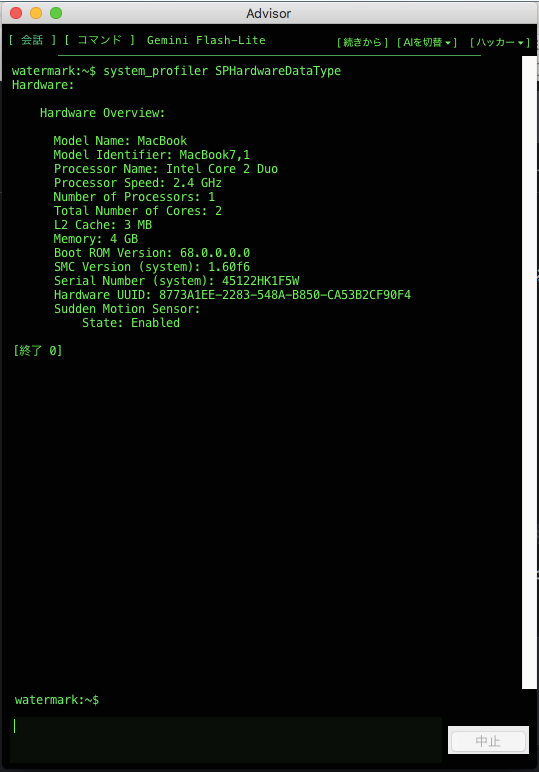
Hacker mode — a real terminal underneath, not a browser tab. It just ran system_profiler and read the actual result.
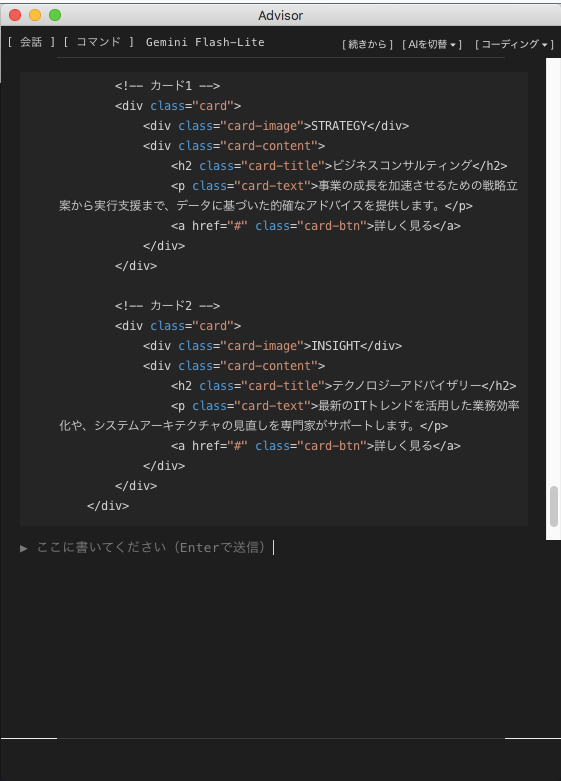
Coding mode — writing real HTML/CSS, not just describing it.
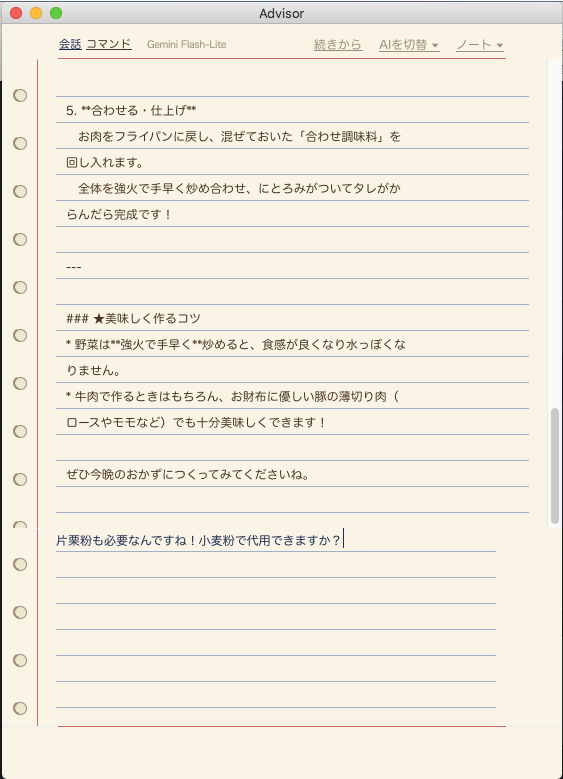
Note mode — the default, for when you just want to talk.
Why I Made This
This started with an old 2010 MacBook someone handed me after they'd basically stopped using it. I first assumed a modern coding agent just wouldn't run on it — High Sierra tops out at VS Code 1.85 — but that turned out to be a plain misunderstanding. Some things do run.
Even so, AI APIs aren't free — I once burned through ¥8,000 (about $50) in three hours without noticing. If I was going to put an old Mac back to work, I wanted something I could reach for without watching the bill.
There were two goals from the start. One was something like a casual chat partner — an exchange diary, except the kind nobody else ever reads, something I could just scribble at without much ceremony. If "exchange diary" doesn't ring a bell, think of the diary version of a status report your manager hands back covered in red-pen corrections — same idea, minus the dread. The other goal was being able to use it straight from the Terminal for a quick coding question or file operation.
Showing both faces — the soft-spoken listener and the sharp, businesslike AI — in one app, in a way that still feels like the same AI underneath, is where Advisor starts. That's also why the GUI has three themes (Note / Coding / Hacker): they're a way to move between those two faces. In the end it all comes back to: don't throw it out yet — it still works, and that'd be a waste.
Changelog
- 2026-09-21 — Initial release (v0.1). A terminal + GUI agent that switches between Claude (Anthropic) and Gemini (Google) for chat and coding help. Three GUI themes (Note / Coding / Hacker), encrypted local conversation history, automatic Japanese/English switching (GUI, terminal, and even the menu bar), and API key setup that happens entirely inside the GUI. Currently supports Mavericks (10.9) through High Sierra (10.13); Snow Leopard–Mountain Lion support is planned but not yet implemented.
Main Features
- Switch between Claude (Anthropic) and Gemini (Google, has a free tier) any time, mid-conversation.
- GUI with three themes — Note (the default), Coding, and Hacker (green on black), switchable from the header at any time. Note mode skips chat bubbles entirely: your question and the reply get written straight onto a single shared notebook page, one after another, the way you'd pass a notebook back and forth with someone. It's not just for chat, either — you can hand it a real coding task without switching modes; watching the code get written straight into the notebook page feels oddly like flipping through an old HTML5 book.
- Also usable straight from the Terminal via the
advisorcommand, for anyone who'd rather skip the GUI. - Conversation history is encrypted and saved locally; nobody without the passphrase can read it, even on a Mac shared with family.
- Automatic Japanese/English switching — GUI text, terminal output, and even the native macOS menu bar all follow the Mac's system language.
- API key setup happens entirely inside the GUI on first launch — no Terminal needed even for that.
Installation
- Unzip
advisor.zipand dragAdvisorinto your Applications folder (or the Dock). - First launch only: right-click (or Control-click)
Advisorinstead of double-clicking, choose "Open," then click "Open" again on the unidentified-developer warning (expected — there's no paid Apple Developer ID signature yet). Every launch after that is a normal double-click. - The first time it runs, you'll see an API key setup screen — follow the prompts. Gemini's free tier lets you start right away at no cost.
Prefer the Terminal? Download the source zip from the Releases page instead, then run bash setup.sh — it walks you through picking a provider, saving the key, installing the advisor command and bash completion, and building Advisor.app locally.
About the API Key (billing)
Advisor itself is free; talking to an AI needs your own API key for whichever provider you pick. No key is embedded in the code anywhere. Gemini's key is free to create at aistudio.google.com, with a no-credit-card free tier. Anthropic's key is pay-as-you-go at console.anthropic.com — a separate site and billing system from a claude.ai subscription.
Supported Environments
| Environment | Intel Mac, Mac OS X 10.9 (Mavericks) through 10.13 (High Sierra) |
|---|---|
| Not yet supported | Snow Leopard–Mountain Lion (10.6–10.8) — planned, needs a from-source OpenSSL/curl toolchain since stock curl there doesn't reach TLS 1.0. |
A personal hobby project provided with no warranty. MIT license — see the GitHub repository above for full source and license files.
The GUI (advisor_gui.py, plain tkinter, no external Python packages) spawns the same
single-file Perl agent used from the Terminal (agent/claude-agent.pl --gui) as a
subprocess and talks to it over stdin/stdout, one JSON object per line. The agent itself doesn't know
or care whether it's being driven by a human typing in a terminal or by the GUI on the other end of a
pipe — the same read_file/write_file/list_dir/run_shell tools, the same Claude↔Gemini
provider abstraction, work either way.
Encrypted history, without relying on anything exotic
Each conversation file is encrypted with a random master key, and that master key is itself wrapped
by your passphrase (and, optionally, a recovery question) into key.enc /
key.recovery.enc — either one can unwrap it, so a forgotten passphrase doesn't mean
lost history. The actual encryption shells out to openssl enc -aes-256-cbc, since that's
what High Sierra's stock LibreSSL already provides; the secret is passed to openssl only via an
environment variable, never through ps output, argv, or disk. High Sierra's LibreSSL
doesn't support -pbkdf2, so key derivation falls back to MD5-based, which is weaker than
ideal — but still a long way better than leaving the history in plaintext.
setup.sh was never run. Originally the GUI
assumed ~/bin/advisor (the wrapper setup.sh generates) already existed, and
just errored out if it didn't. Now, if that wrapper is missing, the GUI drops the bundled
claude-agent.pl/models.txt into ~/claude-build and launches the
Perl agent directly as a fallback — and if no API key is registered yet either, it shows an
onboarding screen (pick a provider, open the signup page with one click, paste the key, verify it
against the real API) instead of the normal chat view. Between the standalone Advisor.app
build and this fallback path, someone can go from "double-click the app" to "talking to an AI" without
ever opening a terminal.
Full source code is on GitHub.
Feedback on this app
Bug reports and requests go straight to the developer, privately — a personal project, so replies aren't guaranteed.